Flight Sharing
Sharing a flight out of the CLEAR app as a rich card that answers “when do I pick you up?” before it’s asked.
Context
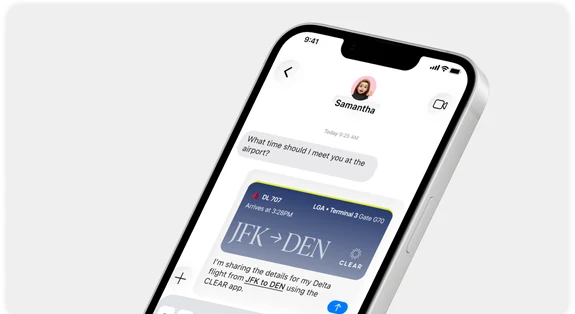
Someone texts “What time should I meet you at the airport?” The answer lives in the CLEAR app — flight number, arrival time, terminal, gate — but getting it into the conversation meant a screenshot or retyping it by hand. Flight Sharing sends it as a card instead.
Problem
Travel details are the most-asked-for and least-shareable thing in the app. A screenshot loses the live status the moment the flight moves, and typing it out drops exactly the details — terminal, gate — that the person picking you up actually needs.
Role & Approach
TODO — your role, the team you worked with, and how the work was scoped.
Process
The shared card carries the flight’s identity and its logistics together: carrier and flight number (DL 707), the route as the headline (JFK → DEN), and the arrival time, terminal, and gate as supporting detail. The CLEAR mark sits on the card so the recipient knows where the information came from and that it is live.
User Journey
A traveler opens their flight in CLEAR, shares it into a thread, and the recipient sees a formatted card rather than a wall of text — enough to plan a pickup without a follow-up question.
Constraints
TODO — how the card degrades outside iMessage, what happens when a flight changes after it’s been shared, and what could be shown to a recipient without a CLEAR account.
Summary
Flight Sharing turns a screenshot into a first-class share — the flight leaves the app with its context intact.
Next Steps
TODO — what shipped, what the results were, and what is still open.